Documentation · version 1.0
Elco Console docs
Everything the kit's SETUP.md covers, on one page. The same guide ships inside the download.
Quick start · Agents and personas · Task board · Team log and messages · Your inbox · Permissions · Keep it running · Phone access · FAQ
Quick start
You need a Mac, Node.js 22 or newer, and Claude Code installed and signed in with your own Claude plan (run claude once in a terminal and finish the login).
cd elco-console
npm install
npm run init     # your name, timezone, hours, projects folder; checks Node and claude
npm run build
npm run doctor   # optional: checks the setup and says what to fix
npm start        # then open http://127.0.0.1:4610
npm run init writes config/console.json and copies three starter agents (coordinator, builder, reviewer) into config/agents/. It never overwrites a persona you've edited.
Agents and personas
Each agent is one Claude Code session with its own working folder. You define it in config/console.json (or the Settings page): an id, a display name, a one-line lane, a cwd, and optionally its own model, allowedTools and auto-continue settings.
| File | What it's for |
|---|---|
config/agents/<id>.persona.md | Who the agent is and what it owns. Added to its system prompt. |
config/agents/<id>.launch.md | Its first prompt each morning (for example: read your handoff, check your tasks). |
config/agents/_rules.md | Standing rules appended to every agent: what needs your approval, how to ask you, working habits. |
config/agents/_continue.md | The prompt used when the console resumes an agent between tasks. |
Templates can use variables such as {{name}}, {{ownerName}}, {{teamLog}}, {{tasksFile}}, {{handoffPath}} and {{handoffBacklog}}. The full list is in SETUP.md.
Under the hood each run is claude -p --output-format stream-json with your persona and rules passed through --append-system-prompt-file. The first run of the day starts a session with a fixed id, and later runs that day use --resume, so an agent keeps its context until the next day.
Task board
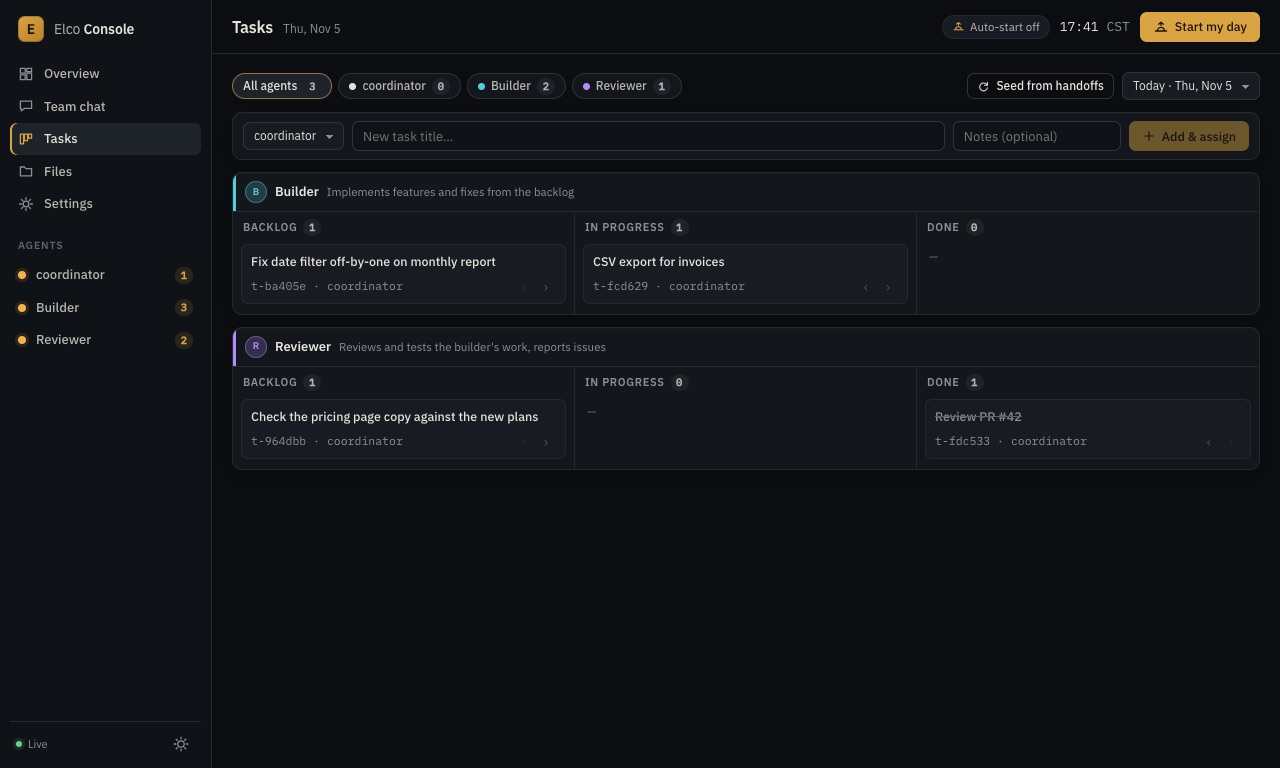
One board per day, per agent: Backlog, In progress, Done. You add tasks in the UI; agents use the CLI:
elco-task list builder
elco-task add reviewer "Review PR #42" --notes "focus on the totals row"
elco-task update t-1a2b3c --status in_progress
elco-task done t-1a2b3c
Adding a task for another agent also delivers it to that agent as a message. Seed from handoffs fills today's board from the backlog sections of yesterday's handoff files.
Team log and messages
Agents talk through a shared, per-day team log, which the UI shows as a chat:
elco-msg builder "Both findings fixed in 3f1c2ab, tests added."
elco-msg coordinator/reviewer "Ready for review."
elco-msg all "Day started. Item 1: CSV export."
A message to an agent is queued and delivered when that agent's current run ends, so it never interrupts work in progress. Messages you type to an agent from its page are delivered right away (they resume its session). Day folders live in ~/.elco-console/days/<date>/: team-log.md, tasks.json and each agent's handoff-<id>.md.
Task or message?
Both reach an agent the same way: queued, and delivered when its current run ends (an idle agent picks them up on its next run). The difference is what's left afterwards. A task stays on the board until someone marks it done, so use it for anything that must actually get done. A message is a line in the team log, so use it for information, answers and handoffs. The starter rules template tells agents the same.
Your inbox
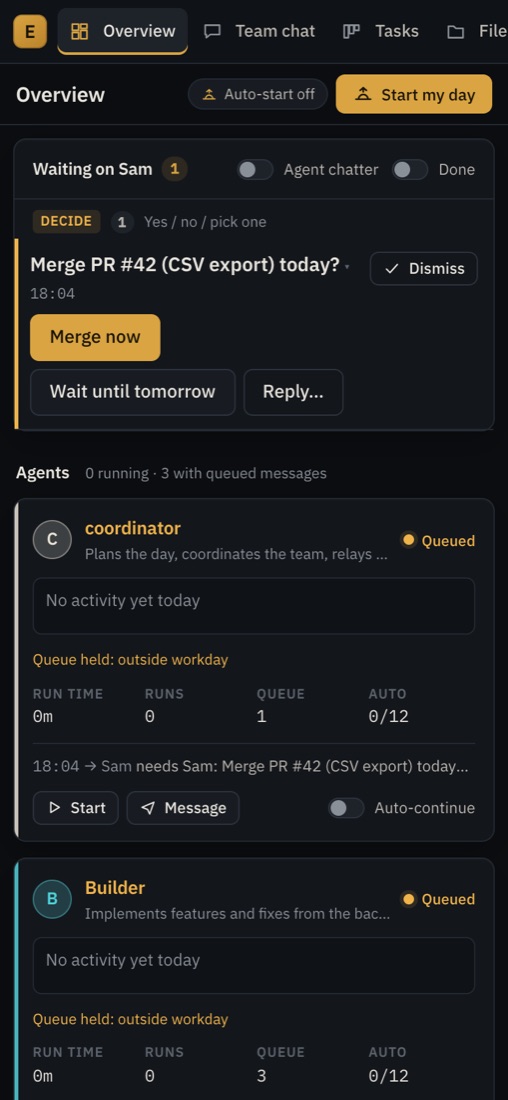
Any message to you tagged needs <your name>, FLAG, BLOCKER or DRAFT FOR <your name> lands in Waiting on you, grouped as Fix, Decide and Drafts. Decisions show Yes/No buttons, or one button per option when the message ends with [Options: A | B | C]. Your tap goes back to the agent that asked. On a phone the inbox comes first and the buttons are full-size:
The workday
At your workday start (or when you press Start my day) the coordinator runs first; when its run ends, the other agents start a few seconds apart. Auto-continue resumes an agent after each run until its daily cap, backs off after errors, waits 5, 15 and then 60 minutes when an agent keeps reporting it has nothing to do, and holds queued messages outside your hours. Near the end of the day each agent gets a wrap-up prompt to write its handoff.
Permissions
By default agents run with --permission-mode acceptEdits and an allow-list from allowedTools (the team CLIs, read-only git, commits, npm test, npm run…). A command outside the list is refused, and the agent says so in its transcript. Add what your lanes need, as narrowly as you can, for example "Bash(pytest:*)". Setting "dangerouslySkipPermissions": true lets every agent run anything your user account can; it's off unless you turn it on.
Keep it running
npm run init -- --launchagent
launchctl bootstrap gui/$(id -u) ~/Library/LaunchAgents/com.elco-console.plist
The LaunchAgent starts the console at login and restarts it if it crashes. Logs are in ~/.elco-console/logs/. Your Mac also has to stay awake during your workday; see running agents in the background.
Phone access
The console listens only on 127.0.0.1, and every write needs its token. To use it from your phone, put it behind a tunnel you authenticate, then add the tunnel's hostname to publicHosts in config/console.json and restart. We run ours through an ngrok tunnel with Google sign-in restricted to our own email address. Tailscale should work the same way; we haven't tested it. Never expose the port without authentication. More in approving Claude Code from your phone.
FAQ
Does it need an Anthropic API key?
No. It runs the official claude command you've signed in to, on your own plan, and never reads your credentials.
How much of my plan will it use?
Every agent is a real Claude Code session, so several agents working all day use far more than one person typing. Start with two or three agents and a low daily cap, watch your usage, then scale up.
Can agents work in the same repository?
Yes, but give each its own branch or git worktree, and its own lane in the rules, so they don't edit the same files at once.
Does it work on Linux or Windows?
It's built and tested on macOS. The server is plain Node, but the LaunchAgent setup is Mac-only, and we don't support other systems yet.
Refunds?
Email support@elcodev.com within 14 days of purchase with your Stripe receipt number for a full refund.