Guides ›
How to take card payments as a mobile groomer
Updated November 11, 2026
Most clients expect to pay by card, and the best moment to get paid is in the driveway, right after the groom. There are three common ways to do it from a van.
Your options
- A card reader that pairs with your phone. Clients tap or insert their card. You carry, charge and keep track of the reader.
- Tap to pay on your phone, where your payment provider supports it on your phone model. No extra hardware.
- A payment link or QR code. The client pays by card on their own phone. Nothing to hand over, and it works when the owner is not home: text the link and they pay from work.
Many groomers also accept cash and app transfers. That is fine, but record them in the same place as card payments, or your numbers will not add up at the end of the month.
Fees to check before you choose
Every option has a card processing fee, and some apps add their own fee on top. Compare the total per payment on a typical groom, not the headline rate. Check also when the money lands in your bank and whether refunds return the fee.
Tips
Clients tip more when it is easy. Say the total, then let them add a tip, and record the tip separately from the service price so you can see what your services really earn.
Deposits and no-shows
For new clients or long appointments, ask for a deposit when they book. A no-show fee only works if it is in your client agreement and you charge it every time. A payment link makes both easy to send by text.
Receipts and disputes
Keep the before and after photos with the appointment. If a client disputes a charge (“the dog was not matted”), a dated photo and your notes are your evidence.
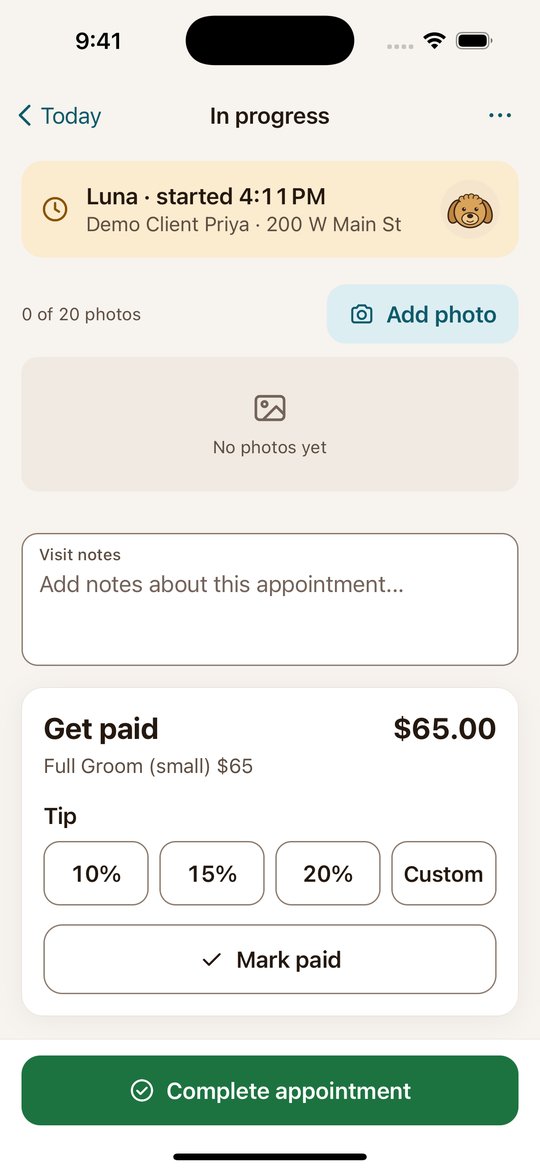
In Clipped, you connect your own Stripe account and send a payment link or show a QR code; the money goes to your Stripe account. On the free plan Clipped adds a 3.5% fee to card payments, and on Pro there is no Clipped fee; Stripe’s processing fees apply either way. You record the amount paid and the tip on the appointment, and you can set a deposit and a no-show fee on your business.
Clipped: the app for mobile groomers
Clients and pets with photos, your day on a calendar and route map, and payment by link or QR code. Free to start on iPhone and Android.
Download on the App StoreGet it on Google PlayMore guides
- How to start a mobile dog grooming business
- How to price mobile dog grooming
- Dog grooming software: what a mobile groomer actually needs
- A groomer app for the van: how to run the day from your phone
- Mobile grooming route planning: fewer miles, more grooms
- Grooming client records: what to keep on every client and pet
- A mobile grooming app for Android