Guides ›
Mobile grooming route planning: fewer miles, more grooms
Updated November 11, 2026
For a mobile groomer, driving is unpaid time. Two extra zig-zags across town can cost you a groom a day. Route planning is mostly done when you book, not when you start the van.
1. Split your area into zones
Draw your service area on a map and cut it into three to five zones you can cross in a short drive. Give each zone one or two days a week (“north side on Tuesdays and Fridays”). When a new client calls, offer the days you are already in their zone first. Most clients would rather take a slot that suits you than wait for a full week.
2. Book the day around a loop
- Start with the stop farthest from home and work back, or the other way round, but do not cross the zone twice.
- Put long grooms (large dogs, heavy coats, a first visit) early, while you have the most energy and the most slack.
- Offer arrival windows (“between 9 and 10”) instead of exact times. It absorbs a dog that takes longer than planned.
3. Leave honest buffers
A stop is not just the groom. It is parking, setting up, a chat at the door, cleaning the tub and the drive to the next address. Time a few real days and use your own average, not the time the groom itself takes. If the day still runs late, the buffer is too small.
4. Charge for distance outside your zones
Clients outside your normal area are worth taking if the price covers the drive. A flat mobile fee for everyone, plus an extra fee beyond a set distance, keeps the far-away stops profitable. Our pricing guide covers how to set it.
5. Check the route the night before
Look at tomorrow as a list of stops with the drive between each one. If two neighbours are three hours apart, move one while you can still text the client. Then drive it in order, with the next address one tap away.
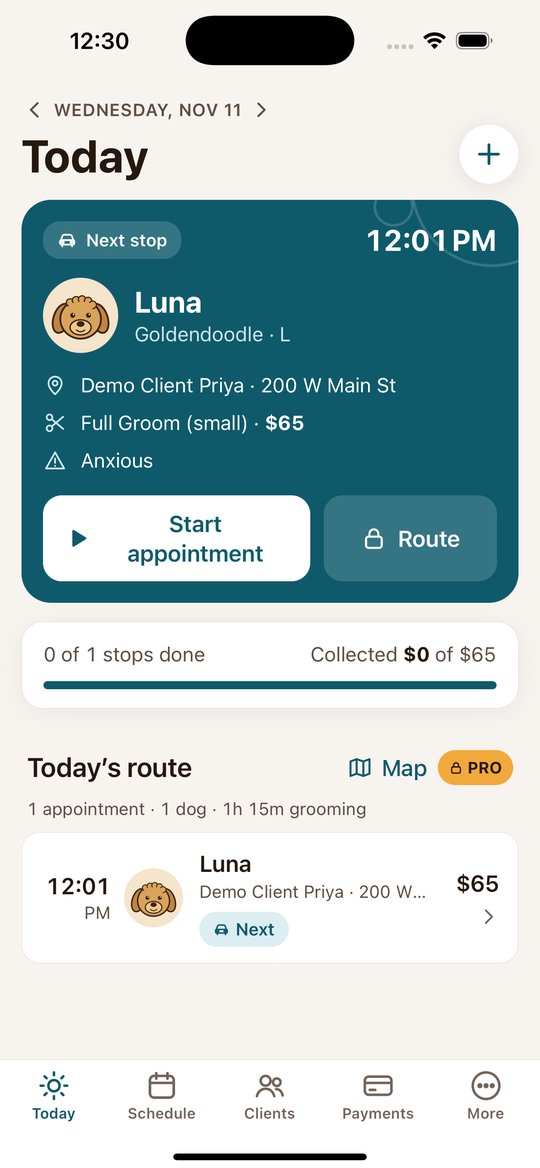
In Clipped, appointments live on a calendar. On Pro, the day’s list shows the drive time and distance between stops (starting from where you are), and the route map shows the stops in order with total distance and drive time. Clipped does not reorder your stops for you; you decide the order when you book.
Clipped: the app for mobile groomers
Clients and pets with photos, your day on a calendar and route map, and payment by link or QR code. Free to start on iPhone and Android.
Download on the App StoreGet it on Google PlayMore guides
- How to start a mobile dog grooming business
- How to price mobile dog grooming
- Dog grooming software: what a mobile groomer actually needs
- A groomer app for the van: how to run the day from your phone
- How to take card payments as a mobile groomer
- Grooming client records: what to keep on every client and pet
- A mobile grooming app for Android